apt-get的好是好,但是不是最新版,各种路径都不熟悉
其实是通过locate nginx这个命令来找到这些目录,然后移除
以下是我的一些命令
rm -rf /etc/nginx/
rm -rf /usr/sbin/nginx
rm -rf /usr/share/doc/nginx
rm -rf /var/log/nginx/
apt-get remove nginx*
:)EOT
apt-get的好是好,但是不是最新版,各种路径都不熟悉
其实是通过locate nginx这个命令来找到这些目录,然后移除
以下是我的一些命令
rm -rf /etc/nginx/ rm -rf /usr/sbin/nginx rm -rf /usr/share/doc/nginx rm -rf /var/log/nginx/ apt-get remove nginx*
:)EOT
最近身体变成了亚健康,终究归于两点:
没有节制:xx,上网,睡觉,抽烟,喝酒
没有坚持住:按时休息、跑步、现电脑时定时休息
生活软硬条件:新鲜空气、卫生条件、洗澡频率
心态:心态和健康有太大关系,总是生气不好,像乔布斯那样脾气绝不可取
想想假如哪一天突然晕倒、突然尿液变色、突然手臂不能动了、颈椎、腰部出问题,你还会这样耗费自己的身体么,到时候就真正的迟了
:)EOT
静态目录重写
location /static/ {
root /var/www/application/blog;
if (-f $request_filename) {
rewrite ^/static/(.*)$  /static/$1 break;
}
判断文件或目录是否存在,不存在返回到首页
if (!-e $request_filename) {
 #rewrite ^/(.*)$ /blog/index.php last;
 #表示完成rewrite,url不变,而permanent是301重定向,会跳到主页url
 rewrite ^/(.*)$ /blog/index.php permanent;
 }
禁止直接访问uploads目录
location ~ ^/blog/wp-content/uploads/ {
        deny all;
        break;
}
图片防盗链
location ~* \.(gif|jpg|jpeg)$ {
valid_referers none blocked www.jpuyy.com jpuyy.com;
if ($invalid_referer) {
rewrite ^/(.*) http://www.jpuyy.com;
}
}
302跳转HTTP/1.1 302 Moved Temporarily
rewrite ^/$ http://2014.jpuyy.com redirect;
301跳转HTTP/1.1 301 Moved Permanently
rewrite ^/2014/?$ /abc/index.php permanent;
:)EOT
前提是通过编译安装的nginx
首先创建好要使用的目录
mkdir sites-available sites-enabled
在nginx.conf里写http{}里加上一句
include sites-enabled/*;
先在sites-available里写好要用使用的配置文件,每一个配置文件写一个server{}
如:
server {
        listen       80;
        server_name  jpuyy.com;

        #charset koi8-r;
        root /var/www/jpuyy/jpuyy.com;

        location / {

            root /var/www/jpuyy/jpuyy.com;
            index  index.html index.htm index.php;
        }

        log_format jpuyy.com.logs '$remote_addr -$remote_user[$time_local]"$request" '
                                '$status $body_bytes_sent "$http_referer" '
                                '"$http_user_agent" $http_x_forard_for';
        access_log /usr/local/nginx/logs/jpuyy.com.log jpuyy.com.logs;

        #error_page  404              /404.html;

        # redirect server error pages to the static page /50x.html
        #
        #error_page   500 502 503 504  /50x.html;
        location = /50x.html {
            root   html;
        }

        # pass the PHP scripts to FastCGI server listening on 127.0.0.1:9000
        #
        location ~ \.php$ {
            fastcgi_pass   127.0.0.1:9000;
            fastcgi_index  index.php;
            fastcgi_param  SCRIPT_FILENAME  /var/www/jpuyy/jpuyy.com/$fastcgi_script_name;
            include        fastcgi_params;
        }

        location /RPC2 {
          include scgi_params;
          scgi_pass localhost:5000;
        }

}
然后进入sites-enabled
ln -s ../sites-available/jpuyy.com.conf
:)EOT
SecureCRT的端口转发功能很实用
会话选项 -> 端口转发 -> 添加
那么勾选使用socks 4 或 5 动态转发到本地的如图端口
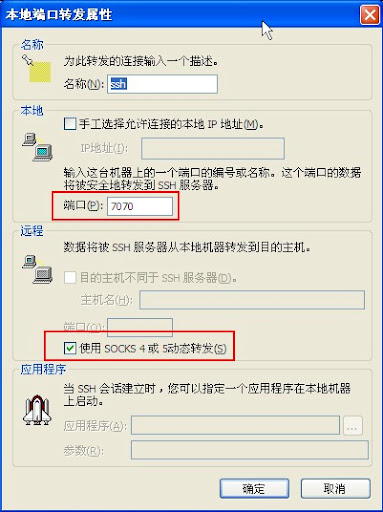
就可以安安心心的使用ssh了(可替代MyenTunnel)
好多需要proxy的程序也能用了
只需输入 127.0.0.1:port 就可以了
有vps就是好
:)EOT
使WordPress中使用Pre标签,经常代码过长,不自动换行
主题–编辑–样式表 (style.css)
找到控制pre的部分
pre {
        font-family: "Courier 10 Pitch", Courier, monospace;
        /* styles to make preformatted text wrap */
        white-space: pre-wrap;       /* css-3 */
        white-space: -moz-pre-wrap;  /* Mozilla, since 1999 */
        white-space: -pre-wrap;      /* Opera 4-6 */
        white-space: -o-pre-wrap;    /* Opera 7 */
        word-wrap: break-word;       /* Internet Explorer 5.5+ */
}