tcpdump是linux命令行下常用的的一个抓包工具,抓包的目的是分析问题。
tcpdump -i eth0 -nn 监听eth0,-nn表示以ip和port方式显示包,不将ip转为主机名,这种在装B的时候可以刷屏,意义不大
所以要实现更精细化的抓包还是需要加更多的参数,使用man tcpdump | less -Ip examples可以查看手册中的例子。以下是常用的例子
查看所有网卡
tcpdump -D
抓取具体协议的包
tcpdump -i eth0 -nn 'udp'
tcpdump -i eth0 -nn 'tcp'
tcpdump -i eth0 -nn 'icmp'
抓取192.168.1.233的包
tcpdump -i eth0 -nn 'host 192.168.1.233'
抓取从192.168.1.233发送的包
tcpdump -i eth0 -nn 'src host 192.168.1.233'
抓取发送到192.168.1.233的包
tcpdump -i eth0 -nn 'src host 192.168.1.233'
多种参数用and连接,如
tcpdump -i eth0 -nn 'tcp port 80 and host 192.168.1.233'
使用tcpdump截取HTTP包会很方便
tcpdump 过滤 HTTP GET
tcpdump -s 0 -A 'tcp[((tcp[12:1] & 0xf0) >> 2):4] = 0x47455420'
tcpdump 过滤 HTTP POST
tcpdump -s 0 -A 'tcp dst port 80 and (tcp[((tcp[12:1] & 0xf0) >> 2):4] = 0x504f5354)'
tcpdump -e 显示以太网数据帧
tcpdump -v 显示进行的分组交换
tcpdump 查看 http 响应全部报文
tcpdump -A -vvvv -s 9999 -i eth0 port 80
查看HTTP的请求和反回头和内容,详见https://sites.google.com/site/jimmyxu101/testing/use-tcpdump-to-monitor-http-traffic
tcpdump -A -s 0 'tcp port 80 and (((ip[2:2] - ((ip[0]&0xf)<<2)) - ((tcp[12]&0xf0)>>2)) != 0)'
tcpdump -X -s 0 'tcp port 80 and (((ip[2:2] - ((ip[0]&0xf)<<2)) - ((tcp[12]&0xf0)>>2)) != 0)'
1. To monitor HTTP traffic including request and response headers and message body:
tcpdump -A -s 0 ‘tcp port 80 and (((ip[2:2] – ((ip[0]&0xf)<<2)) – ((tcp[12]&0xf0)>>2)) != 0)’
2. To monitor HTTP traffic including request and response headers and message body from a particular source:
tcpdump -A -s 0 ‘src example.com and tcp port 80 and (((ip[2:2] – ((ip[0]&0xf)<<2)) – ((tcp[12]&0xf0)>>2)) != 0)’
3. To monitor HTTP traffic including request and response headers and message body from local host to local host:
tcpdump -A -s 0 ‘tcp port 80 and (((ip[2:2] – ((ip[0]&0xf)<<2)) – ((tcp[12]&0xf0)>>2)) != 0)’ -i lo
4. To only include HTTP requests, modify “tcp port 80” to “tcp dst port 80” in above commands
5. Capture TCP packets from local host to local host
tcpdump -i lo
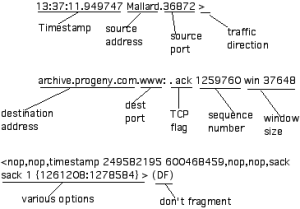
tcpdump flag解读
| TCP Flag |
Flag in tcpdump |
Flag Meaning |
| SYN |
s |
Syn packet, a session establishment request. The first part of any TCP connection. |
| ACK |
ack |
Ack packet, used to acknowledge the receipt of data from the sender. May appear in conjunction with other flags. |
| FIN |
f |
Finish flag, used to indicate the sender’s intention to terminate the connection to the receiving host. |
| RESET |
r |
Indicates the sender’s intention to immediately abort the existing connection. |
| PUSH |
p |
Signals the immediate push of data from the sending host to the receiving host. For interactive applications such as telnet, the main issue is the quickest response time, which this “push” flag signals. |
| URGENT |
urg |
Urgent data should take precedence over other data. For example, a Ctrl-C to terminate a FTP download. |
| Placeholder |
0 |
If the connection does not have a syn, finish, reset, or push flag set, this placefolder flag will be found after the destination port. Note that it also appears in conjunction with the ack flag. |
tcpdump读出来的信息可以保存方便查看和分析
保存pcap信息,可以用WireShark来查看
tcpdump -i vmbr1 -nn -vv -tttt -s 65535 -w tcpdump.pcap
如果担心文件过大可以加 -C 跟数字,当文件达到这个值(MB)之后,会新生成tcpdump.pcap.2
抓取 sql 语句
tcpdump -i bond0 -s 0 -l -w -  | strings | perl -e '
while(<>) { chomp; next if /^[^ ]+[ ]*$/;
    if(/^(SELECT|UPDATE|DELETE|INSERT|SET|COMMIT|ROLLBACK|CREATE|DROP|ALTER|CALL)/i)
    {
        if (defined $q) { print "$q\n"; }
        $q=$_;
    } else {
        $_ =~ s/^[ \t]+//; $q.=" $_";
    }
}'
查看保存文件的格式
# file tcpdump.pcap
tcpdump.pcap: tcpdump capture file (little-endian) - version 2.4 (Ethernet, capture length 65535)
对于保存的文件可以用-r读取,相当于对之前的抓取的过程进行回放。
tcpdump -ttttnnr tcpdump.pcap
tcpdump -qns 0 -X -r tcpdump.pcap
tcpdump -e -r tcpdump.pcap
wireshark filter
重传
tcp.analysis.retransmission
过滤 tcp stream
tcp.stream eq 1