Blog

  • shell下通过ping判断网络是否断开


    #!/bin/bash
    #for use:
    #author: [email protected]
    #modified by xx at date
    #version:
    #history:
    #relate on:
    PATH=/bin:/sbin:/usr/bin:/usr/sbin:/usr/local/bin:/usr/local/sbin:~/bin
    export PATH
    netstat=$(ping -c3 g.cn|grep transmitted |awk '{print $4}')
    if((netstat==0))
    #time out
    then
            date >> network.down.log
    else
    #ok
            echo "network is ok"
    fi


    ping 命令学习

    ping 默认是每秒钟一次,如果需要更改时间,可以 -i interval, 只有 root 可以写小于 0.2 秒的时间。

    ping -i 5 223.5.5.5
    ping -i 0.1 223.5.5.5

    ping 本地回环地址有三种方式

    ping 0
    ping localhost
    ping 127.0.0.1

    ping 具体次数结束,如 100 次

    ping -c 100 jpuyy.com

    使用 flood 方式 ping

    ping -f 0

    只显示 ping 的结果

    ping -c 5 -q 127.0.0.1

    设置发送的 ping 包大小 -s 单位是 bytes, ping 自带的 header 头大小 28 bytes

    ping -s 1000 jpuyy.com
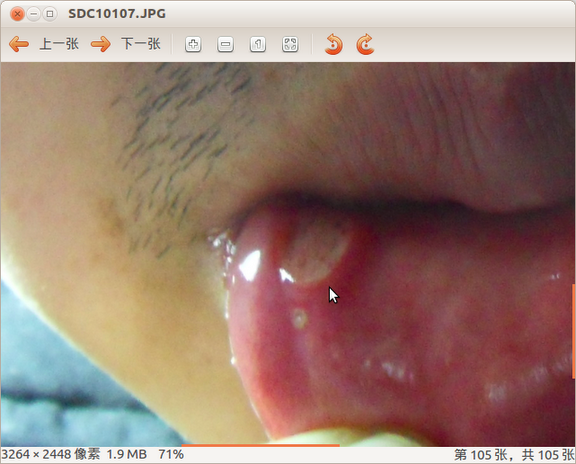
  • 嘴唇内侧咬伤(有图慎入),整理下解决办法

    吃饭太快,不小以咬伤,查看了一下网上,口腔本来就是有杀菌物质的,而且有损伤恢复能力很强,也不会留疤,所以不用担心。以前都是不在意的,所以这次也没在意,吃饭一向重口味,辛辣的也不克制,现在成了这个样子:

    oral-cavity-medicine

    这时候拖着就不行了,所以又查了一下网上,三种不同方向的提示:

    A.生理盐水洗伤口

    现在没盐水,就算了,这期间要经常保持口腔卫生。

    B.用西瓜霜等消肿,防止出现溃疡

    C.吃消炎药

    没特殊情况我是不吃消炎药、抗生素的,所以排除。“老百姓一般所指的消炎药估计就是抗生素,但实际上严格意义上讲消炎药和抗生素应该是不同的两类药物。  我们所用的抗生素不是直接针对炎症来发挥作用的,而是针对引起炎症的微生物,是杀灭微生物的,而消炎药是针对炎症的,比如常用的阿斯匹林等等非甾体类消炎镇痛药。”

    于是打算买一些消肿的含片,在选择用药方面双出现了误区,本来搜了一下西瓜霜,去商店买时,没有,牵扯出金嗓子,胖大海,板蓝根等,最后拿了金嗓子回来。

    西瓜霜具有清热泻火、消肿止痛的优良功效,被历代医学家视之为口腔、咽喉病的良药。西瓜霜不仅是一剂百年口咽疾病的良药,也是一剂外用良药,对烧烫伤、脓疱疮、臁疮、褥疮等有良好的去腐生肌、拔毒排脓、更新疮面的作用。

    金嗓子喉宝是一种药物,有疏风清热、除口臭、解毒消肿、利咽止痛,适用于咽喉肿痛、声音嘶哑、急性咽炎、急性喉炎等功效。有抗炎,镇痛功效。

    胖大海(学名:Sterculia lychnophora),梧桐科植物的干燥种子,生长于越南、印度、马来西亚等地。又名莫大、澎大海、安南子、大海子、大洞果、胡大海、胡大发。主治清热润肺,利咽解毒,润肠通便。用于肺热声哑,干咳无痰,咽喉干痛,热结便闭,头痛目赤。

    板蓝根(常用别名:靛青根、蓝靛根、大青根)是一种中药材。中国各地均产。板蓝根分为北板蓝根和南板蓝根,北板蓝根来源为十字花科植物菘蓝(Isatis tinctoria L.)和草大青(I. indigotica Fort.)的根;南板蓝根为爵床科植物马蓝(Baphicacanthus cusia (Nees) Brem.)的根茎及根。具有清热解毒、凉血消肿、利咽之功效。

    看来买的金嗓子是买错了,只能用它的抗炎,镇痛作用了。

    另外,保证休息时间一定是养伤的一条良方。


  • svn log 不会显示刚刚提交的内容


    If you make a commit and immediately type svn log with no arguments, you may notice that your most recent commit doesn’t show up in the list of log messages. This is due to a combination of the behavior of svn commit and the default behavior of svn log. First, when you commit changes to the repository, svn bumps only the revision of files (and directories) that it commits, so usually the parent directory remains at the older revision (See 第 3.5.1 节 “更新和提交是分开的” for an explanation of why). svn log then defaults to fetching the history of the directory at its current revision, and thus you don’t see the newly committed changes. The solution here is to either update your working copy or explicitly provide a revision number to svn log by using the –revision (-r) option.

    如果刚刚提交就用svn log命令,则不会显示刚刚提交的内容。因为svn commit操作与svn log操作之间的联系,当提交的时候,只会改变当前文件或目录的版本号,svn log会抓取当前版本,而不会管新提交的。可以先svn update 再查看或用类似svn log -r 8 -v来查看。

  • ubuntu 官方源 | sources.list

    这里只记录官方源,就是以 .ubuntu.com 形式的源,其他源就不用了,还是官方的靠谱

    2012年3月追加11.10官方源

    deb http://security.ubuntu.com/ubuntu oneiric-security main restricted
    deb-src http://security.ubuntu.com/ubuntu oneiric-security main restricted
    deb http://security.ubuntu.com/ubuntu oneiric-security universe
    deb-src http://security.ubuntu.com/ubuntu oneiric-security universe
    deb http://security.ubuntu.com/ubuntu oneiric-security multiverse
    deb-src http://security.ubuntu.com/ubuntu oneiric-security multiverse


    2012年3月4日追加12.04官方源

    deb http://archive.ubuntu.com/ubuntu/ precise main restricted universe multiverse
    deb http://archive.ubuntu.com/ubuntu/ precise-security main restricted universe multiverse
    deb http://archive.ubuntu.com/ubuntu/ precise-updates main restricted universe multiverse
    deb http://archive.ubuntu.com/ubuntu/ precise-proposed main restricted universe multiverse
    deb http://archive.ubuntu.com/ubuntu/ precise-backports main restricted universe multiverse
    deb-src http://archive.ubuntu.com/ubuntu/ precise main restricted universe multiverse
    deb-src http://archive.ubuntu.com/ubuntu/ precise-security main restricted universe multiverse
    deb-src http://archive.ubuntu.com/ubuntu/ precise-updates main restricted universe multiverse
    deb-src http://archive.ubuntu.com/ubuntu/ precise-proposed main restricted universe multiverse
    deb-src http://archive.ubuntu.com/ubuntu/ precise-backports main restricted universe multiverse

    如提示:
    W: GPG 错误:http://archive.ubuntu.com precise Release: 由于没有公钥,无法验证下列签名: NO_PUBKEY 40976EAF437D05B5
    则执行:sudo apt-key adv –keyserver keyserver.ubuntu.com –recv 40976EAF437D05B5

    清理 apt deb 缓存文件,释放磁盘空间

    apt-get clean
    
  • 2012-03-10主题3个

    A.在原则里面加一条 ,不要为了新鲜去升级系统和软件 ,那就是当定了小白鼠.每次升级 ubuntu.出错误一大堆 ,等着提交报告帮他们解决问题吧 ;支持开源也不能这么 奉献.等下下个版本出来以后 ,再升级是不错的方法.

    B.尽人事 ,就会心安理得 .不管结果怎么 ,时间是用对地方就好.

    C.积累知识 -转为见识 -形成胆识 ,都是一点一点的 ,得有耐心和决心.

  • kindle touch到手了,好小

    “即使你能确认什么是完美,也不要让完美成为好的敌人。更何况你不能确认。因为
    落入过去陷阱的不悦,你会在设计时因为担心自己的缺陷而无所作为。”
    —Greg Hudson,Subversion 开发者

    和以前的kindle3相比,好小

    操作起来没有什么不便,和kindle3用起来也没什么差别

    现在多多用它看书,发挥它的价值

    使用技巧:

    1.选定一个单词,弹出的窗口中选择more-> translation -> chinese simplified,即可翻译成中文。需要联网,它是自动去www.bing.com/translator来翻译。