Blog

  • python encode decode编码

    utf8编码的涵义

    UTF-8 is one of the most commonly used encodings. UTF stands for “Unicode Transformation Format”, and the ‘8’ means that 8-bit numbers are used in the encoding.

    早在1968年,ASCII代码发表了,代表了0到127的字母数字,但仍表示不了其他国家的字母,1980s之后,处理器变为8-bit,变为了0-255,后来为为了16-bit,说明2^16 = 65,536。之后utf-8出现了。

    可以用type或isinstance来判断变量是什么类型

    >>> s = '杨'
    >>> type(s)
    <type 'str'>
    >>> isinstance(s, str)
    True
    >>> isinstance(s, unicode)
    False
    

    如果前面加一个u符号指定用unicode编码

    >>> a = u'杨'
    >>> type(a)
    <type 'unicode'>
    >>> isinstance(a, str)
    False
    >>> isinstance(a, unicode)
    True
    

    python encode unicode编码

    >>> str = "上海"
     >>> print str
     上海
     >>> print data.encode("unicode_escape")
     \\u4ea4\\u6362\\u673a
     >>> print data.encode("raw_unicode_escape")
     \u4ea4\u6362\u673a

    python decode unicode编码

    >>> data = "\u4ea4\u6362\u673a"
    >>> type(data)
    <type 'str'>
     >>> print data.decode('unicode_escape')
     交换机
     当字符串本身有\时,使用
     >>> print data.decode('raw_unicode_escape')
     交换机

    参考文档:

    https://docs.python.org/2/howto/unicode.html
  • python str字符串处理

    几个实际的例子

    string = “abc”

    字符串的长度
    len(string)

    转换为小写
    string.lower()

    转换为大写
    string.upper()

    统计字符串里一个字母a出现的次数

    string.count(‘a’)

    查找子串在一个字符串出现的位置,从0开始算,如果没找到返回-1

    >>> string = ‘i love you’
    >>> string.find(‘love’)
    2

    转换int to str

    >>> a = 2

    >>> type(a)

    <type ‘int’>

    >>> str(a)

    ‘2’

    将字符串中的替换

    .replace(‘:’,’’)

    sum([bin(int(x)).count(‘1’) for x in ‘255.255.255.224’.split(‘.’)])

    strip和split

    strip() #removes from both ends

    lstrip() #removes leading characters (Left-strip)

    rstrip() #removes trailing characters (Right-strip)

    >>> s = ‘ i love you ‘
    >>> print s.strip()
    i love you
    >>> print s.lstrip()
    i love you
    >>> print s.rstrip()
    i love you
    >>> help(” abc”.strip)
    >>> help(“abc”.split)

  • npm-nodejs包管理器

    npm — node package manager

    全局安装nodejs包

    npm -g install net-ping

    查看已经安装的nodejs应用

    npm ls -g installed

    创建项目过程,首先创建一个目录 mvc-express ,进入后输入

     npm init

    回答一些问题创建项目

    This utility will walk you through creating a package.json file.
    It only covers the most common items, and tries to guess sane defaults.
    
    See `npm help json` for definitive documentation on these fields
    and exactly what they do.
    
    Use `npm install  --save` afterwards to install a package and
    save it as a dependency in the package.json file.
    
    Press ^C at any time to quit.
    name: (mvc-express) 
    version: (0.0.0) 0.0.1
    description: my try of express
    entry point: (app.js) 
    test command: npm test
    git repository: 
    keywords: 
    author: jpuyy
    license: (ISC) 
    About to write to /private/var/forge/node/mvc-express/package.json:
    
    {
      "name": "mvc-express",
      "version": "0.0.1",
      "description": "my try of express",
      "main": "app.js",
      "scripts": {
        "test": "npm test"
      },
      "author": "jpuyy",
      "license": "ISC"
    }
    
    
    Is this ok? (yes) yes
    

    接下来我要安装一些包时,使用 npm install –save ,会自动加入到 package.json 中

    npm install express --save

    清理缓存
    npm cache clean

    检查
    npm audit fix

  • macOS 操作技巧

    清除dns缓存

    Mac OS X 10.7 & 10.8 & 10.9

    sudo killall -HUP mDNSResponder
    

    在粘贴到备忘录的时候文字带样式很难看,无格式粘贴的快捷键为四个按键

     Option Shift ⌘ V

    finder与terminal互相切换

    由finder当前路径打开terminal,使用Go2shell

    在terminal路径下打开finder, 使用 open . 或pwd获取当前路径,然后按 Shift ⌘ G输入路径。

    显示桌面

    ⌘ F3

    在 terminal 中将显示结果复制到剪切板 “pbcopy” (pasteboard copy)

    ls | pbcopy

    将剪切板中的内容输出到一个文件中

    pbpaste > file.log

    将标准输出的内容显示在一个文件中

    ls index.php| open -fe

    查看哪个程序打开 80 端口

    lsof -n -i4TCP:80 | grep LISTEN

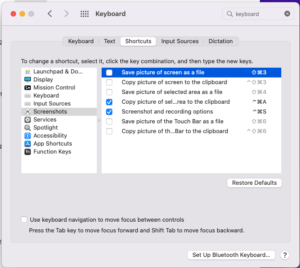
    把 Screenshots 的区域截图设置习惯的快捷键
    Copy picture of selected area to the clipboard: command + control + A
    Screenshot and recording options: command + control + S

    Finder 显示隐藏文件?
    Command + Shift + . 点

    打字的时候删除一个单词(OneNote)
    Ctrl + Backspace

    Command + F1 切换是镜像还是扩展屏

  • nginx echo模块

    http://wiki.nginx.org/HttpEchoModule

    我这里在ubuntu下使用nginx,

    查看nginx版本,nginx -V

    nginx version: nginx/1.1.19

    确保有nginx-echo模块

    –add-module=/build/buildd/nginx-1.1.19/debian/modules/nginx-echo

    接下来在ip.jpuyy.com中添加配置,返回客户端ip,同时在http头中也加返回客户端ip

    server {
            listen       80;
            server_name  ip.jpuyy.com;
    
            location / {
                root /usr/share/nginx/jpuyy.com;
                index ip.html;
                add_header X-Client-IP $remote_addr;
                echo $remote_addr;
            }
    
    }
    

    获取自己的ip地址

    ➜  curl ip.jpuyy.com

    183.195.128.xx

    ➜  curl -I ip.jpuyy.com

    HTTP/1.1 200 OK

    Server: nginx/1.1.19

    Date: Sat, 23 Aug 2014 05:24:03 GMT

    Content-Type: application/octet-stream

    Connection: keep-alive

    X-Client-IP: 183.195.128.xx

    curl -I ip.jpuyy.com | grep X-Client |sed ‘s/ //’ | cut -d: -f2

  • redis操作笔记

    设置key jpuyy

    127.0.0.1:6379> set jpuyy [email protected]
     OK

    选择数据库,查看数据库存量

    127.0.0.1:6379[1]> select 0
    OK
    127.0.0.1:6379> DBSIZE
    (integer) 1000004
    127.0.0.1:6379> select 1
    OK
    127.0.0.1:6379[1]> DBSIZE
    (integer) 0

    把某个key移动到另外的一个库,如库2

    127.0.0.1:6379> MOVE key_85544 2
    (integer) 1
    127.0.0.1:6379> select 2
    OK
    127.0.0.1:6379[2]> get key_85544
    "value_85544"
    127.0.0.1:6379[2]> select 0
    OK
    127.0.0.1:6379> get key_85544
    (nil)

    判断jpuyy是否存在

    127.0.0.1:6379> EXISTS jpuyy
    (integer) 1

    对key设置超时时间,前提是此key已经存在

    127.0.0.1:6379> EXPIRE jpuyy 10
    (integer) 1

    对不存在的key设置超时会返回0

    127.0.0.1:6379> EXPIRE jpuyynoexist 10
    (integer) 0

    查看一个key的生存时间

    127.0.0.1:6379> TTL key_749100
    (integer) 188

    不存在的key会返回-2

    127.0.0.1:6379> TTL key_749100134
    (integer) -2

    永久化一个key

    127.0.0.1:6379> PERSIST key_749100
    (integer) 1

    永久化的key查看过期时间会返回-1

    127.0.0.1:6379> TTL key_749100
    (integer) -1

    永久存储一个key

    取出所有的key(或部分key),生产环境绝对不能使用

    127.0.0.1:6379> keys *
    127.0.0.1:6379> KEYS key_749*

    返回一个随机的key

    127.0.0.1:6379> RANDOMKEY

    如果key的value很大,可以通过命令行输出,-n 表示 select 1

    redis-cli -n 1 -h 192.168.1.69 get g.node.match.live.key.26097 > ~/a

    删除key

    127.0.0.1:6379> del key_673907
    (integer) 1
    127.0.0.1:6379> get key_673907
    (nil)

    info命令可以查看redis运行的各种信息

    CONFIG GET *   可以查看当前生效的值

    CONFIG GET *memory*
    1) "maxmemory"
    2) "32212254720"

    config set 可以查看设置配置,不用重启即可生效

    危险动作

    清空当前db

    flushdb

    清空所有db

    flushall

    停止服务

    127.0.0.1:6379> SHUTDOWN