Blog

  • nodejs-forever

    node.js的forever可保证进程挂掉之后重启,保证高可用

    Monitors the script specified in the current process or as a daemon

    [Daemon]                                                                                                                                                                     

      The forever process will run as a daemon which will make the target process start

      in the background. This is extremely useful for remote starting simple node.js scripts

      without using nohup. It is recommended to run start with -o -l, & -e.

      ex. forever start -l forever.log -o out.log -e err.log my-daemon.js

    常用动作有

    start Start SCRIPT as a daemon
    stop Stop the daemon SCRIPT
    stopall Stop all running forever scripts
    restart Restart the daemon SCRIPT
    restartall Restart all running forever scripts
    list List all running forever scripts
    config Lists all forever user configuration
    set Sets the specified forever config
    clear Clears the specified forever config
    logs Lists log files for all forever processes
    logs <script|index> Tails the logs for <script|index>
    columns add
    Adds the specified column to the output in `forever list`
    columns rm
    Removed the specified column from the output in `forever list`
    columns set Set all columns for the output in `forever list`
    columns reset Resets all columns to defaults for the output in `forever list`
    cleanlogs [CAREFUL] Deletes all historical forever log files

    例子:

    查看被forever启动的进程

    forever list

    重启具体某一个脚本,如果不知道绝对路径,forever会自动匹配重启

    forever restart myscript.js

    –sourceDir指定js脚本位置

    forever stop --sourceDir=/data/nodejs/ start.js

    -l 指定log所在位置, -e 指定错误日志,-o指console的输出,-a 追加的方式,平时使用时最好把-l, -e, -o全用上。

    forever start -l /var/log/nodejs/log -e /var/log/nodejs/error -o /var/log/nodejs/out.log -a --sourceDir=/data/nodejs start.js
  • rsyslog以及logger命令

    配置 rsyslog

    cat /etc/rsyslog.d/custom_logging.conf

    # 定义模板
    $template CUSTOM_LOGS,"/var/log/%programname%.log"
    if ($programname == 'my_custom_app') then ?CUSTOM_LOGS
    # 匹配到后停止后续匹配
    &~
    
    if ($programname startswith 'm') then ?CUSTOM_LOGS
    &~
    

    使用 logger 测试上面的配置

    logger -t my_custom_app "==================>my_custom_app" 会记录到 /var/log/my_custom_app.log 
    logger -t my_custom_app_1 "==================>my_custom_app_1" 会记录到 /var/log/my_custom_app_1.log
    

    logger命令是syslog的shell接口

    测试上面的配置

    把文件记录到syslog里

    logger -f filename

    后面直接跟要记录的文本

    logger jpuyy.com

    可以看到这样一条记录

    Sep 13 16:55:51 iZ28bz7jrdyZ root: jpuyy.com

    参考:

    http://help.papertrailapp.com/discussions/questions/96-how-to-log-a-message-from-the-linux-command-line.html

  • python encode decode编码

    utf8编码的涵义

    UTF-8 is one of the most commonly used encodings. UTF stands for “Unicode Transformation Format”, and the ‘8’ means that 8-bit numbers are used in the encoding.

    早在1968年,ASCII代码发表了,代表了0到127的字母数字,但仍表示不了其他国家的字母,1980s之后,处理器变为8-bit,变为了0-255,后来为为了16-bit,说明2^16 = 65,536。之后utf-8出现了。

    可以用type或isinstance来判断变量是什么类型

    >>> s = '杨'
    >>> type(s)
    <type 'str'>
    >>> isinstance(s, str)
    True
    >>> isinstance(s, unicode)
    False
    

    如果前面加一个u符号指定用unicode编码

    >>> a = u'杨'
    >>> type(a)
    <type 'unicode'>
    >>> isinstance(a, str)
    False
    >>> isinstance(a, unicode)
    True
    

    python encode unicode编码

    >>> str = "上海"
     >>> print str
     上海
     >>> print data.encode("unicode_escape")
     \\u4ea4\\u6362\\u673a
     >>> print data.encode("raw_unicode_escape")
     \u4ea4\u6362\u673a

    python decode unicode编码

    >>> data = "\u4ea4\u6362\u673a"
    >>> type(data)
    <type 'str'>
     >>> print data.decode('unicode_escape')
     交换机
     当字符串本身有\时,使用
     >>> print data.decode('raw_unicode_escape')
     交换机

    参考文档:

    https://docs.python.org/2/howto/unicode.html

  • python str字符串处理

    几个实际的例子

    string = “abc”

    字符串的长度
    len(string)

    转换为小写
    string.lower()

    转换为大写
    string.upper()

    统计字符串里一个字母a出现的次数

    string.count(‘a’)

    查找子串在一个字符串出现的位置,从0开始算,如果没找到返回-1

    >>> string = ‘i love you’
    >>> string.find(‘love’)
    2

    转换int to str

    >>> a = 2

    >>> type(a)

    <type ‘int’>

    >>> str(a)

    ‘2’

    将字符串中的替换

    .replace(‘:’,’’)

    sum([bin(int(x)).count(‘1’) for x in ‘255.255.255.224’.split(‘.’)])

    strip和split

    strip() #removes from both ends

    lstrip() #removes leading characters (Left-strip)

    rstrip() #removes trailing characters (Right-strip)

    >>> s = ‘ i love you ‘
    >>> print s.strip()
    i love you
    >>> print s.lstrip()
    i love you
    >>> print s.rstrip()
    i love you
    >>> help(” abc”.strip)
    >>> help(“abc”.split)

  • npm-nodejs包管理器

    npm — node package manager

    全局安装nodejs包

    npm -g install net-ping

    查看已经安装的nodejs应用

    npm ls -g installed

    创建项目过程,首先创建一个目录 mvc-express ,进入后输入

     npm init

    回答一些问题创建项目

    This utility will walk you through creating a package.json file.
    It only covers the most common items, and tries to guess sane defaults.
    
    See `npm help json` for definitive documentation on these fields
    and exactly what they do.
    
    Use `npm install  --save` afterwards to install a package and
    save it as a dependency in the package.json file.
    
    Press ^C at any time to quit.
    name: (mvc-express) 
    version: (0.0.0) 0.0.1
    description: my try of express
    entry point: (app.js) 
    test command: npm test
    git repository: 
    keywords: 
    author: jpuyy
    license: (ISC) 
    About to write to /private/var/forge/node/mvc-express/package.json:
    
    {
      "name": "mvc-express",
      "version": "0.0.1",
      "description": "my try of express",
      "main": "app.js",
      "scripts": {
        "test": "npm test"
      },
      "author": "jpuyy",
      "license": "ISC"
    }
    
    
    Is this ok? (yes) yes
    

    接下来我要安装一些包时,使用 npm install –save ,会自动加入到 package.json 中

    npm install express --save

    清理缓存
    npm cache clean

    检查
    npm audit fix

  • macOS 操作技巧

    清除dns缓存

    Mac OS X 10.7 & 10.8 & 10.9

    sudo killall -HUP mDNSResponder
    

    在粘贴到备忘录的时候文字带样式很难看,无格式粘贴的快捷键为四个按键

     Option Shift ⌘ V

    finder与terminal互相切换

    由finder当前路径打开terminal,使用Go2shell

    在terminal路径下打开finder, 使用 open . 或pwd获取当前路径,然后按 Shift ⌘ G输入路径。

    显示桌面

    ⌘ F3

    在 terminal 中将显示结果复制到剪切板 “pbcopy” (pasteboard copy)

    ls | pbcopy

    将剪切板中的内容输出到一个文件中

    pbpaste > file.log

    将标准输出的内容显示在一个文件中

    ls index.php| open -fe

    查看哪个程序打开 80 端口

    lsof -n -i4TCP:80 | grep LISTEN

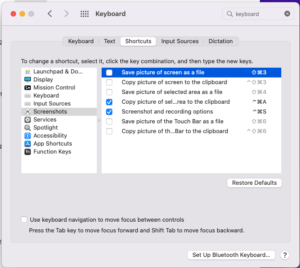
    把 Screenshots 的区域截图设置习惯的快捷键
    Copy picture of selected area to the clipboard: command + control + A
    Screenshot and recording options: command + control + S

    Finder 显示隐藏文件?
    Command + Shift + . 点

    打字的时候删除一个单词(OneNote)
    Ctrl + Backspace

    Command + F1 切换是镜像还是扩展屏