从ttyo那里以男朋友的价格买来了ipad2 wifi 白色。
ttyo条件比我好,也知道我喜欢苹果的产品,这小妞对我很好。
我也不能总把面子放在前面,好好工作,好好对她。

从ttyo那里以男朋友的价格买来了ipad2 wifi 白色。
ttyo条件比我好,也知道我喜欢苹果的产品,这小妞对我很好。
我也不能总把面子放在前面,好好工作,好好对她。
:set fileencoding
即可显示文件编码格式。
如果你只是想查看其它编码格式的文件或者想解决 用Vim查看文件乱码的问题,那么在
~/.vimrc 文件中添加以下内容:
set encoding=utf-8 fileencodings=utf-8
这样,就可以让vim自动识别文件编码(可以自动识别UTF-8或 者GBK编码的文件),其实就是依照fileencodings提供的编码列表尝试,如果没有找到合适 的编码,就用latin-1(ASCII)编码打开。
如打开windows中以ANSI保存的文件
vim file.txt -c "e ++enc=GB18030"
在Vim中直接进行转换文件编码,比如将一个文件转换成utf-8格式
:set fileencoding=utf-8
查看文件格式
:set fileformat?
设置文件格式为 unix
:set fileformat=unix
设置 Byte Order Mark (BOM)
:set bomb
只保留文件 file a.txt 为 UTF-8 Unicode (with BOM) text, with CRLF line terminators
:e ++ff=dos
这两天遇到问题:支付宝在https下不能正常返回支付成功的消息,几经周折,支付宝技术人员给出了日志
unable to find valid certification path to requested target
之后给出了SSL检测结果:The intermediate CA certificates cannot be found for the following certificate chain.
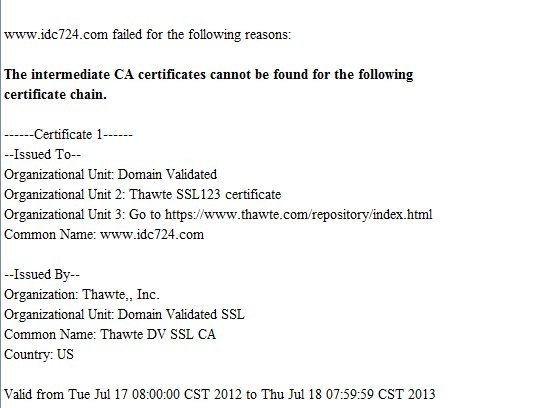
这才发现是CA证书没安好,回头去https://www.thawte.com重新找到了CA证书才安装检测通过。
这个是SSL是否安装成功的检测页面,需安好java:
https://search.thawte.com/support/ssl-digital-certificates/index?page=content&id=SO9555
如果你的浏览器比较新如IE9,chrome,可以使用 https://ssl-tools.verisign.com/ 可以检测CSR请求和crt证书。
把需要改权限为777的目录写到test.txt里
每行一个
然后在chmod.sh里加入如下内容
#!bin/bash
while read LINE
do
 chmod 777 $LINE
done < $1
执行
bash chmod.sh test.txt
github使用ssh认证,说白了就是认证关系,以前电脑A(笔记本ubuntu)的~/.ssh/id_rsa下有私钥,github上填写好了公钥内容id_rsa.pub,认证关系打通了。
私钥要保护好,公钥随便用。公钥就好比你家大门,私钥是钥匙,大门可以随便给人看到,但钥匙不能给人随便用。私钥的默认名字是id_rsa,它的权限是600。
现在如果换电脑B(如vps),也是用linux,那么现在有两种方法,
步骤如下:
cp A上~/.ssh/id_rsa 到B上 ~/.ssh/id_rsa.github,并把权限改为600
在B上创建~/.ssh/config,写入以下内容,保存退出。
它声名了目标主机是github.com,用户git,认证方式和文件,
PS:为方便连接其他主机时也可用这种方法,在同一机器上连接多个github账号也可使用这种方法。http://rsylareclipse.blog.163.com/blog/static/18550144020121285148377/
Host github.com
 User git
 Hostname github.com
 PreferredAuthentications publickey
 IdentityFile ~/.ssh/id_rsa.github
测试下能成功
jpuyy@www:~/.ssh$ ssh -T [email protected]
 Hi jpuyy! You've successfully authenticated, but GitHub does not provide shell access.
这和在A上第一次使用时方法一样,但为了不使用默认名id_rsa,可用如下命令
ssh-keygen -C "[email protected]" -f ~/.ssh/id_rsa.github
这时把id_rsa.github.pub的内容copy到对应github.com的ssh公钥里
ubuntu下安装git
sudo apt-get install git git-core
或者到新立得软件包里面 输入 git 安装。
在本地使用git
git init
git add .
git commit -m 'project init'
在库的目录下
git add .     #存储到本地
git commit -m 'message'    #存储时的标记(message是说明文字)
git pull   #下载服务器代码
git push   #上传代码至github
只检出最近一次提交的commit
git clone [email protected]:jpuyy/forge.jpuyy.com.git --depth=1
已经写了一些代码之后想要把代码放入到git库里,先放到本地,再推到bitbucket代码仓库里
cd /path/to/my/repo
git init
git add .
git commit -m 'project init'
git remote add origin ssh://[email protected]/jpuyy/nginx.conf.git
git push -u origin --all # pushes up the repo and its refs for the first time
git push -u origin --tags # pushes up any tags
git刚创建的库提交时提示
➜ jpuyy-shells git:(master) git push
No refs in common and none specified; doing nothing.
Perhaps you should specify a branch such as 'master'.
fatal: The remote end hung up unexpectedly
Everything up-to-date
需要创建一个master分支
➜ jpuyy-shells git:(master) git push --set-upstream origin master
Counting objects: 3, done.
Delta compression using up to 4 threads.
Compressing objects: 100% (2/2), done.
Writing objects: 100% (3/3), 408 bytes | 0 bytes/s, done.
Total 3 (delta 0), reused 0 (delta 0)
To [email protected]:jpuyy/jpuyy-shells.git
* [new branch] master -> master
Branch master set up to track remote branch master from origin.
在develop分支下获取master最新
git pull origin master
将Develop分支发布到Master分支的命令
# 切换到Master分支
git checkout master
# 对Develop分支进行合并
git merge --no-ff develop
git merge --ff-only develop
git clone github 库
git clone https://[email protected]/username/repo_name .
git相关的一些命令
git-add . 只是刷新了git的跟踪信息,其实并没有提交到 git 的内容跟踪范畴之内
git-status 我们能看到 git 的状态提示
git-init-db 初始化git数据库
git-add hello.c 添加文件
git-log 查看修改、提交记录
git-branch bb 创建分支
git-branch 查看分支
git-checkout bb 切换工作分支
设置提交的用户名和邮箱
git config --global user.name "jpuyy"
git config --global user.email "[email protected]"
查看git log的时候,显示高亮
git config --local color.ui true
获取当前config的信息
git config --list
git使用http代理
git config --global http.proxy 'socks5://127.0.0.1:1080'
git config 的配置可以调用默认编辑器 vim 编辑
git config --global -e
git-mv roredu.c helight.c 修改文件名
单独恢复一个文件为版本库最新状态
git checkout -- config/index.js
使用git rm 删除文件
git rm file1.txt
git commit -m “remove file1.txt”